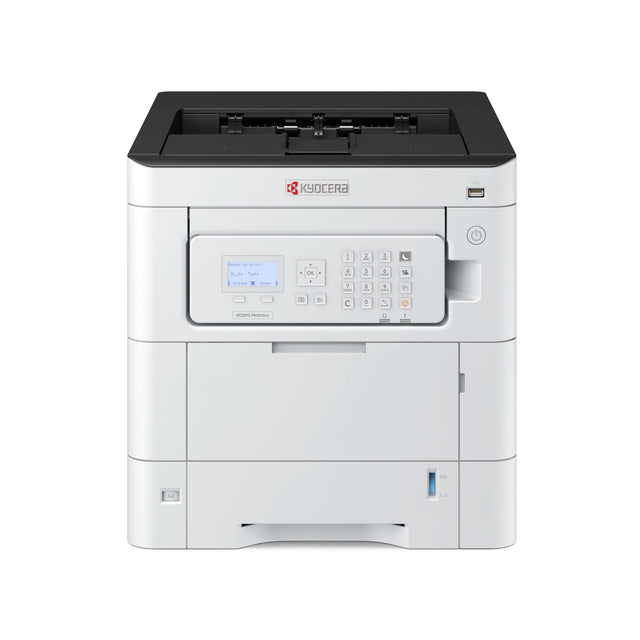
HP Color LaserJet Enterprise M554dn Duplex Color Laser Printer vs KYOCERA ECOSYS PA3500cx Color Laser Printer: both are laser printers. The main differences: automatic two-sided printing (M554dn has it). The M554dn costs less.
| M554dn | PA3500cx | |
|---|---|---|
| Type | Laser printer | Laser printer |
| Color | Color | Color |
| Functions | ||
| Speed | — | 37 ppm |
| Wi-Fi | No | No |
| Auto 2-sided | Yes | — |
| Fax | No | No |
| Weight | 63 lb | 80 lb |
| Availability | Ships within 7 business days | Ships within 7 business days |
| Toner / ink | Toner for HP Color LaserJet Enterprise M554dn | — |
| Buy | M554dn | PA3500cx |
Which should you buy?
- Choose the M554dn if you need automatic two-sided printing.
- Choose the PA3500cx if the extra features of the other one don't matter to you.


More: printer comparisons · buying guides
Related guides
- HP Color LaserJet Enterprise M554dn Duplex Color Laser Printer vs KYOCERA ECOSYS PA2600cwx Color Laser Printer
- HP Color LaserJet Enterprise M554dn Duplex Color Laser Printer vs KYOCERA ECOSYS PA4500cx Color Laser Printer
- Alternatives to the HP Color LaserJet Enterprise M554dn Duplex Color Laser Printer
- Canon Color imageCLASS LBP674Cdw II Wireless vs HP Color LaserJet Enterprise M554dn Duplex Color Laser Printer
- HP Color LaserJet Enterprise 4701dn Color Laser Printer vs KYOCERA ECOSYS PA3500cx Color Laser Printer
- HP Color LaserJet Enterprise 4701dw Color Laser Printer vs KYOCERA ECOSYS PA3500cx Color Laser Printer
Understanding the HP Color LaserJet Enterprise M554dn
What kind of printer this is
A color laser printer fuses toner powder onto paper. It is fast, crisp on text and good for business color such as charts, flyers and logos. Toner never dries out, so it is reliable even if you print only now and then.
What the specs mean
- Color
- Prints in color using four cartridges (black, cyan, magenta, yellow), each replaced separately.
- Auto 2-sided (duplex)
- Prints on both sides of the page by itself, which cuts paper use in half.
The real cost of a printer
The price tag is only the start. Over 3 years most printers cost more in toner than to buy. Before choosing, compare:
- Cost per page: cartridge price ÷ page yield.
- Recommended monthly volume: the pages per month it handles comfortably. The bigger duty cycle number is a maximum, not a target.
- Starter cartridges: many printers ship with setup cartridges that hold less than a full one. Plan your first order early.
Setting it up
- Unpack it and remove all orange tape and packing pieces, including inside the covers and paper tray.
- Install the toner cartridge(s) and load paper.
- Power on and follow the screen to pick your language.
- Install the driver or app from HP's website (HP Smart). Avoid driver CDs, which are often out of date.
- Print a test page, then register the printer to activate the warranty.
Who it's best for
- Offices printing color documents, charts and flyers
- Real estate, schools, churches and marketing material
Keep it running well
- Keep a spare cartridge on hand so a busy day never stops.
- Use good, dry paper and fan the stack before loading to avoid jams.
- Install firmware updates from HP for fixes and security.
- Faded pages, streaks or jams? Start with our troubleshooting guides.
Printer terms, explained
Laser vs inkjet
Laser printers use toner powder. They are fast, crisp on text, have a low cost per page and never dry out. Inkjets use liquid ink and are best for photos, at a lower purchase price. Full comparison
Mono vs color
Mono (black-and-white) printers use one cartridge and cost less per page. Color printers add cyan, magenta and yellow cartridges for charts, flyers and photos.
All-in-one (MFP)
A printer that also scans and copies, and sometimes faxes. MFP stands for multifunction printer.
ADF
Automatic document feeder: a tray on top that pulls a stack of pages through the scanner, so you don't scan page by page.
Duplex (auto 2-sided)
Prints on both sides of the paper automatically, which saves paper. On many model names, a "d" means duplex and a "w" means wireless.
PPM
Pages per minute on standard text pages. A team of 5–10 people is comfortable from about 30 ppm.
Duty cycle vs monthly volume
Duty cycle is the maximum a printer can survive in a month. The recommended monthly volume, usually much lower, is what it handles comfortably. Choose by the second number.
DPI
Dots per inch: print sharpness. 600 dpi is crisp for text, and 1200 dpi or more matters for fine graphics and photos.
Wi-Fi, Wi-Fi Direct, Ethernet
Wi-Fi joins your network. Wi-Fi Direct lets a phone connect to the printer without a network. Ethernet (cable) is the most reliable choice for shared office printers.
Starter cartridges
Many new printers include setup cartridges with less toner or ink than a full replacement. Order your first full cartridge early.
Buying for several offices, or reselling? Get a volume quote or apply for wholesale pricing →