

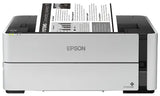

Epson EcoTank ET-M1170 Wireless Monochrome Supertank Printer vs HP Smart Tank 7603 Ink Tank Printer: both are close inkjet printers. The main differences: color (7603 has it); scanning and copying (7603 has it); Wi-Fi (M1170 has it). The 7603 costs less.
| M1170 | 7603 | |
|---|---|---|
| Type | Inkjet printer | Inkjet all-in-one |
| Color | Black & white | Color |
| Functions | Print, Scan, Copy | |
| Speed | — | — |
| Wi-Fi | Yes | No |
| Auto 2-sided | — | — |
| Fax | No | No |
| Weight | 13 lb | 24 lb |
| Availability | In stock | Ships within 7 business days |
| Buy | M1170 | 7603 |
Which should you buy?
- Choose the M1170 if you need Wi-Fi.
- Choose the 7603 if you need color and scanning and copying.


More: printer comparisons · buying guides
Related guides
- Epson EcoTank ET-M1170 Wireless Monochrome Supertank Printer vs HP Smart Tank 6003 Ink Tank Printer
- Epson EcoTank ET-M2170 Wireless Monochrome All-in-One Supertank Printer vs HP Smart Tank 7603 Ink Tank Printer
- Epson EcoTank ET-M1170 Wireless Monochrome Supertank Printer vs HP Officejet 200 Mobile Printer
- Epson EcoTank ET-M1170 Wireless Monochrome Supertank Printer vs HP OfficeJet Pro 9110b Color Inkjet Printer
- Alternatives to the Epson EcoTank ET-M1170 Wireless Monochrome Supertank Printer
- Brother INKvestment 4355 Wireless Color Inkjet Printer vs HP Smart Tank 7603 Ink Tank Printer
Understanding the Epson EcoTank ET-M1170
What kind of printer this is
An ink tank printer (Epson) is filled from bottles instead of cartridges. It costs more up front, but its cost per page is a fraction of a cartridge printer's, often under a cent for black. A set of bottles prints thousands of pages.
What the specs mean
- Black & white
- Prints black only, so you buy one cartridge and the cost per page is lower.
- Wi-Fi
- Print from laptops and phones anywhere on your network, with no cable. USB is there as a backup.
The real cost of a printer
The price tag is only the start. Over 3 years most printers cost more in ink than to buy. Before choosing, compare:
- Cost per page: cartridge price ÷ page yield.
- Recommended monthly volume: the pages per month it handles comfortably. The bigger duty cycle number is a maximum, not a target.
- Starter cartridges: many printers ship with setup cartridges that hold less than a full one. Plan your first order early.
Setting it up
- Unpack it and remove all orange tape and packing pieces, including inside the covers and paper tray.
- Install the ink: fill each tank from its matching bottle and load paper.
- Power on and follow the screen to pick your language and join your Wi-Fi.
- Install the driver or app from Epson's website (Epson Smart Panel). Avoid driver CDs, which are often out of date.
- Print a test page, then register the printer to activate the warranty.
Who it's best for
- Families, schools and offices that print a lot of color
- Anyone tired of buying cartridges
Keep it running well
- Keep a spare cartridge on hand so a busy day never stops.
- Use good, dry paper and fan the stack before loading to avoid jams.
- Install firmware updates from Epson for fixes and security.
- Faded pages, streaks or jams? Start with our troubleshooting guides.
Printer terms, explained
Laser vs inkjet
Laser printers use toner powder. They are fast, crisp on text, have a low cost per page and never dry out. Inkjets use liquid ink and are best for photos, at a lower purchase price. Full comparison
Mono vs color
Mono (black-and-white) printers use one cartridge and cost less per page. Color printers add cyan, magenta and yellow cartridges for charts, flyers and photos.
All-in-one (MFP)
A printer that also scans and copies, and sometimes faxes. MFP stands for multifunction printer.
ADF
Automatic document feeder: a tray on top that pulls a stack of pages through the scanner, so you don't scan page by page.
Duplex (auto 2-sided)
Prints on both sides of the paper automatically, which saves paper. On many model names, a "d" means duplex and a "w" means wireless.
PPM
Pages per minute on standard text pages. A team of 5–10 people is comfortable from about 30 ppm.
Duty cycle vs monthly volume
Duty cycle is the maximum a printer can survive in a month. The recommended monthly volume, usually much lower, is what it handles comfortably. Choose by the second number.
DPI
Dots per inch: print sharpness. 600 dpi is crisp for text, and 1200 dpi or more matters for fine graphics and photos.
Wi-Fi, Wi-Fi Direct, Ethernet
Wi-Fi joins your network. Wi-Fi Direct lets a phone connect to the printer without a network. Ethernet (cable) is the most reliable choice for shared office printers.
Starter cartridges
Many new printers include setup cartridges with less toner or ink than a full replacement. Order your first full cartridge early.
Buying for several offices, or reselling? Get a volume quote or apply for wholesale pricing →


